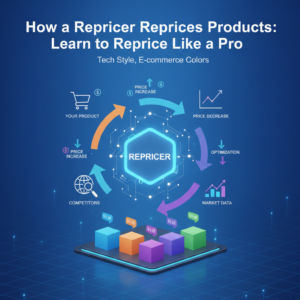
Amazon Pricing Tools, Pricing Software Amazon & Amazon Pricing Rules Guide
If you’re selling on Amazon in 2026, you already know how fast prices move. One minute you’re winning the Buy Box, the next you’re buried under competitors who adjusted their prices while you were sleeping. That’s exactly why understanding and using the right amazon pricing tools has become less of a luxury and more of a survival skill for serious sellers.
This guide breaks down everything you need to know — from pricing software to rules, strategies, and smarter automation — in plain, no-fluff language.
Amazon Pricing Tools, Pricing Software Amazon Solutions & Amazon Pricing Rules Explained
Why amazon marketplace pricing Is Harder Than It Looks
Most new sellers assume pricing on Amazon is simple: list your product, set a price, done. But amazon marketplace pricing is a constantly shifting battlefield. You’re competing with dozens of sellers, sometimes hundreds, all vying for the same Buy Box position. Amazon’s algorithm factors in not just price but also shipping speed, seller metrics, and fulfillment method.
In 2026, the competition has only intensified. FBA and FBM sellers are both leveraging automation, which means if you’re still manually updating prices, you’re already at a disadvantage.
| Pricing Method | Speed | Accuracy | Buy Box Impact |
|---|---|---|---|
| Manual Pricing | Slow | Low | Minimal |
| Rule-Based Repricing | Fast | Medium | Moderate |
| AI-Powered Repricing | Real-Time | High | Strong |
What Are amazon pricing rules and How Do They Work?
Simply put, amazon pricing rules are conditions you set that tell your repricing tool when and how to change a product’s price. Think of them as automated decision-makers that run 24/7 on your behalf.
A typical rule might say something like: “If a competitor drops below my price by more than 5%, match their price — but never go below my minimum profit margin.” These rules let you stay competitive without constantly babysitting your listings.
Common Types of Pricing Rules
- Beat the lowest competitor by a fixed amount or percentage
- Match the Buy Box price exactly
- Stay above a minimum price floor to protect margins
- Apply different rules for FBA vs FBM competitors
- Increase prices when you’re the only seller in stock
Setting up smart rules is genuinely one of the most powerful things you can do. It’s not just about going lower — it’s about going strategic.
Choosing the Right pricing software amazon Sellers Actually Use
Not all repricing tools are created equal. Some are basic, rule-only platforms. Others use machine learning and Buy Box intelligence to make smarter pricing decisions in real time. When evaluating pricing software amazon sellers rely on, you’ll want to look at a few key factors.
Key Features to Look For
- Real-time competitor price monitoring
- Buy Box tracking and win-rate reporting
- Profit guardrails to protect your margins
- Support for both FBA and FBM sellers
- Scenario-based strategy engines
- Easy onboarding with no steep learning curve
The amazon automatic pricing tool category has grown significantly in 2026. The best tools now combine data intelligence with flexible rule-setting so you can truly automate at scale without losing control.
| Feature | Basic Tools | Advanced Tools (e.g., Zupricer) |
|---|---|---|
| Rule-Based Repricing | Yes | Yes |
| Buy Box Intelligence | No | Yes |
| Profit Guardrails | Limited | Full Control |
| FBA + FBM Support | Sometimes | Yes |
| Real-Time Adjustments | No | Yes |
The Role of price optimization tools in Your Amazon Strategy
Beyond just repricing, price optimization tools help you find the sweet spot between competitiveness and profitability. Rather than just chasing the lowest price, they analyze market patterns, competitor behavior, and your own cost structure to recommend or automatically apply the most profitable price at any given moment.
This is a game changer for sellers managing large catalogs. Doing this manually across hundreds of SKUs would be a full-time job — and even then, you’d still miss real-time shifts.
Frequently Asked Questions
What is the best Amazon pricing tool in 2026?
The best tool depends on your catalog size, fulfillment method, and goals. For sellers looking for Buy Box intelligence combined with profit protection, tools like Zupricer consistently rank highly — rated 4.9/5 on both Trustpilot and Capterra.
Do Amazon pricing rules hurt my margins?
Only if they’re set up poorly. Well-configured rules include minimum price floors, so you never drop below your target margin. Automation should protect your profits, not destroy them.
Is repricing software worth it for small sellers?
Absolutely. Even small sellers benefit from automated repricing because it ensures you’re always competitive without manual effort. Many tools, including Zupricer, offer free trials so you can test before committing.
Getting Started Without Feeling Overwhelmed
The truth is, pricing strategy doesn’t have to be complicated. Start with a few solid rules, monitor how they affect your Buy Box win rate, and refine from there. The right tool will do most of the heavy lifting. In 2026, winning on Amazon is increasingly about who automates smarter — not just who prices lower.
Ready to take your pricing strategy to the next level? Zupricer is built specifically for Amazon sellers like you, combining Buy Box intelligence, profit guardrails, and real-time automation across your entire catalog. Whether you’re FBA or FBM, Zupricer works for you. Try it free for 14 days — no credit card required — and see the difference smart repricing makes. Sign up now at app.zupricer.com/signup and join thousands of sellers already winning the Buy Box smarter.
Setting Up Amazon Automated Pricing: A Step-by-Step Implementation Guide
Implementing amazon automated pricing doesn’t require a technical background, but it does demand a clear setup workflow. The process begins with connecting your Amazon seller account through API credentials, which most modern tools handle through secure OAuth authentication. Once connected, your product catalog syncs automatically, pulling in current prices, inventory levels, and competitor data.
The next critical step involves configuring your initial pricing rules. Start by defining minimum and maximum price boundaries for each product or category. These guardrails prevent your amazon seller pricing tool from making decisions that could damage profitability. Most sellers set minimums at break-even plus desired margin, while maximums prevent pricing yourself out of the market during low-competition periods.
After establishing boundaries, configure competitive response rules. Decide whether you want to match, beat by a percentage, or use Buy Box-focused strategies. Test your rules on a small subset of products first, monitor performance for 48-72 hours, then scale across your catalog once you’ve validated the approach works for your business model.
API Connection and Data Synchronization
Modern amazon seller pricing software platforms connect directly to Amazon’s MWS or SP-API, enabling real-time data exchange. This connection allows the system to monitor competitor prices, track Buy Box status, and update your listings within seconds of market changes. The initial sync typically takes 15-30 minutes depending on catalog size, after which updates occur continuously in the background.
Rule Configuration Best Practices
When setting up automated pricing amazon rules, prioritize simplicity over complexity initially. A basic three-rule framework works well for most sellers: one rule for high-competition products focused on Buy Box winning, another for medium-competition items balancing profit and velocity, and a third for low-competition SKUs maximizing margin. You can always add sophistication later as you understand how the market responds to your pricing changes.
Automated Pricing vs Manual Pricing: The Complete Comparison Framework
The decision between automated and manual pricing fundamentally comes down to time investment, accuracy, scalability, and cost-benefit analysis. Manual pricing requires constant monitoring—successful sellers often check competitor prices 3-5 times daily, which translates to 15-25 hours weekly for a moderate catalog. This approach works for sellers with fewer than 50 SKUs in stable markets, but quickly becomes unsustainable as catalogs grow.
Automated systems monitor competitors continuously, adjusting prices within minutes of market shifts. The accuracy advantage is substantial: human error in manual repricing leads to missed Buy Box opportunities or margin-damaging mistakes, while automated systems execute rules precisely every time. Scalability represents perhaps the biggest differentiator—manual methods collapse beyond 100-200 products, whereas automation handles thousands of SKUs effortlessly.
From a cost-benefit perspective, most repricing tools cost between $50-$200 monthly. If automation recaptures even 10% more Buy Box time, the revenue increase typically exceeds the software cost within days for active sellers. The real question isn’t whether automation pays for itself, but rather how much profit you’re leaving on the table without it.
Time Investment Analysis
| Catalog Size | Manual Hours/Week | Automated Hours/Week | Time Saved |
|---|---|---|---|
| 50 SKUs | 8-12 | 1-2 | 6-10 hours |
| 200 SKUs | 25-35 | 2-3 | 22-32 hours |
| 500+ SKUs | Impractical | 3-4 | Full-time equivalent |
Choosing the Right Tool: Seller-Specific Selection Criteria
Not every seller needs the same features from their repricing software. Your ideal tool depends heavily on catalog size thresholds, fulfillment method, budget constraints, and integration requirements. Sellers with under 100 SKUs can often succeed with basic rule-based tools, while those managing 500+ products benefit significantly from AI-powered systems that learn market patterns and optimize beyond simple rules.
FBA versus FBM considerations matter tremendously. FBA sellers should prioritize tools that understand Amazon’s fulfillment advantage in the Buy Box algorithm, while FBM sellers need software that can compete strategically despite the fulfillment disadvantage. Mixed-method sellers require tools sophisticated enough to apply different strategies based on fulfillment type.
Budget tiers range from free basic tools to enterprise solutions costing $500+ monthly. For most professional sellers, the $100-$200 range offers the best value—enough sophistication to drive real results without enterprise complexity. Integration requirements also factor in: sellers using inventory management systems or multi-channel platforms need repricing tools with robust API support and data export capabilities.
Decision Matrix by Seller Profile
- New sellers (under 50 SKUs): Start with rule-based tools offering free trials and simple interfaces
- Growing sellers (50-500 SKUs): Invest in mid-tier solutions with Buy Box intelligence and profit protection
- Established sellers (500+ SKUs): Choose advanced platforms with AI optimization and multi-channel support
- FBA-focused sellers: Prioritize tools that leverage fulfillment advantages in pricing strategy
- Multi-channel sellers: Require platforms supporting Amazon, eBay, Walmart, and other marketplaces simultaneously