Disclosure: this guide is published by Zupricer, which makes Amazon repricing software. It draws on Amazon’s Automate Pricing documentation, Selling Partner API (SP-API) developer docs and peer-reviewed research, checked on November 16, 2026. Numbers in the recipes are starting points to test, not benchmarks.
Quick answer: The best Amazon repricing strategy is a set of rules, not a single setting: hard guardrails first (cost-based floor, sensible ceiling, maximum step per change), then exceptions (Amazon on the listing, sole seller, low stock), then a competitive rule for the normal case — usually matching or holding against the Featured Offer rather than undercutting the lowest price. Pick a recipe for each listing situation, change one variable at a time and judge results on Buy Box share and margin together.
Key takeaways
- Guardrails beat cleverness: a floor based on real costs prevents most repricing disasters.
- Match or hold beats “always undercut by $0.01” — research links undercutting spirals to falling prices for everyone.
- Different listings need different recipes: crowded, sole seller, Amazon on listing, low stock, aged stock.
- Keep Seller Central’s min/max in sync with your repricer, or Amazon may deactivate offers.
How repricers actually see the market
Every rule you write reacts to data Amazon provides. Knowing what that data is explains why some rules work and others don’t (SP-API notifications, price adjustment workflows):
- Offer-change notifications fire when any of the top 20 offers for a product changes, when the Featured Offer winner or price changes, or when the external reference price changes. Offers are ranked by landed price (price + shipping). You only receive them for products you sell.
- Pricing Health notifications arrive when your offer becomes ineligible for the Featured Offer because of its price, with reference prices such as the recent average selling price and competitive external price.
- Featured Offer Expected Price is the price at or below which your offer can become the Featured Offer — a far better target than “lowest price”.
- Price updates are sent through Amazon’s Listings API, which can preview whether a price would cause pricing-policy or Featured Offer issues before it’s submitted.
Rules that react to these signals in real time — instead of checking prices on a schedule — respond while the opportunity still exists. For how the Featured Offer is chosen, see our Amazon Buy Box guide.
Rule priority: the order matters
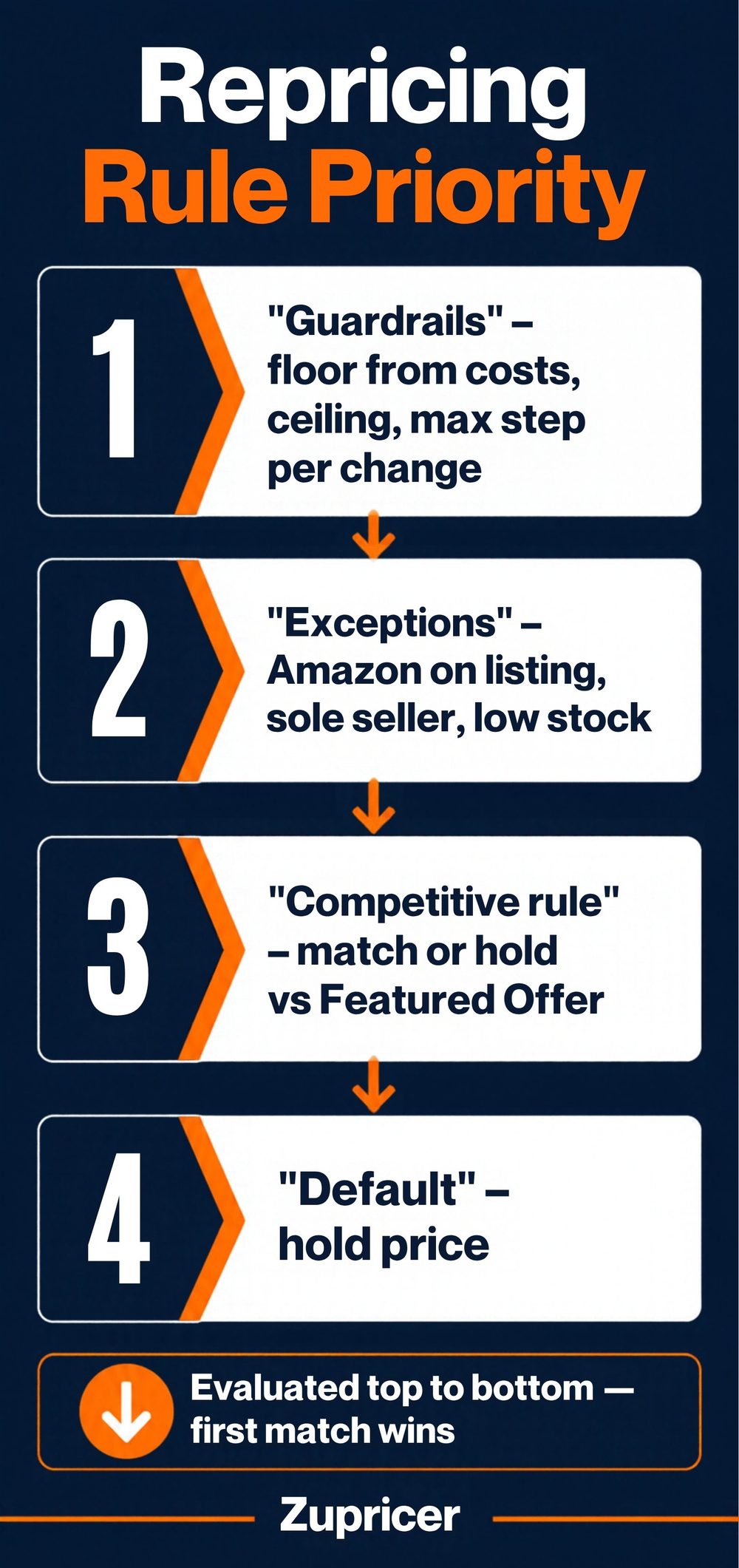
Most repricers check rules top to bottom and apply the first one that matches. Put them in this order:
- Guardrails (always on): minimum price from your costs, maximum price, maximum change per update. Nothing overrides these.
- Exceptions: Amazon is on the listing; you’re the only seller; stock is low; the competitor is below your floor.
- Competitive rule: how to position against the Featured Offer and other offers in the normal case.
- Default: what to do when nothing else applies (usually hold).
If exceptions sit below the competitive rule, they never fire — a common reason repricers “keep lowering the price” even when you’re the only seller.
The repricing rule recipe library
Starting points to adapt and test — not universal settings.
| Scenario | Rule | Starting settings | Watch out for |
|---|---|---|---|
| Crowded FBA listing (several FBA sellers) | Match the Featured Offer; hold when you already have it | Compare against FBA offers only; small steps; floor from costs | Two “match” repricers can lock prices — use hold when winning |
| Your FBA vs many FBM offers | Ignore slow FBM offers; compete on landed price | Exclude FBM offers with long handling; compare price + shipping | Fast FBM/SFP offers are real competition — don’t exclude them |
| Amazon is on the listing | Hold or match, don’t chase below floor | Separate rule for the Amazon offer | Racing Amazon on price rarely pays |
| You’re the only seller | Move toward your maximum | Step up gradually; cap below external/recent prices | Too high triggers Pricing Health ineligibility |
| Private label with occasional hijackers | Hold price; alert on new sellers | Don’t follow unauthorized offers down; use brand-protection tools | Price wars with hijackers erode brand value |
| Arbitrage (bought below market) | Compete actively; turn stock fast | Floor from your actual unit cost; faster cadence | Costs differ per batch — update floors |
| Wholesale, thin margins | Match, never undercut | Tight floor with minimum margin; small max step | One-cent undercuts wipe margin quickly |
| Low stock | Raise price to slow sales | Higher target when units fall below your reorder point | Stock-outs also cost ranking — reorder early |
| Aged or slow stock | Clearance by sell-through | Lower step-by-step toward break-even before storage fees rise | Never below break-even unless liquidating |
| Competitor below your floor | Sit at floor or hold | Choose: stay at minimum, or keep your current price | Constant floor time = price war or wrong floor |
Match, hold or undercut?
Match keeps you competitive without starting a spiral. Hold (keep your price when you already have the Featured Offer) protects margin. Undercut only makes sense when you’re clearly worse on delivery or rating and need price to compensate — and even then, by small amounts above your floor. More in why undercutting kills profits.
Guardrails that keep repricing profitable
- Cost-based floor per SKU: landed cost + fees + target profit, divided by (1 − referral %). Use our minimum price calculator, and see how to set min and max price rules.
- Ceiling: high enough to capture stock-outs, low enough to stay credible next to recent and external prices.
- Maximum change per update: limits “whiplash” if a competitor makes a pricing error.
- Keep Seller Central min/max in sync: Amazon uses the minimum and maximum prices set in Seller Central as a safety net. If your repricer sends a price outside them, the offer can be deactivated as a potential pricing error and must be reactivated in Pricing Health.
- Different floors for FBA and FBM: costs differ, so floors should too — see FBA vs FBM.
Oscillation, “resetting” and price wars: what research shows
Some sellers deliberately alternate between lower and higher prices to win sales, then recover margin — often called oscillation. Research gives useful context:
- A 2016 study of Amazon best-sellers by Northeastern University researchers found that sellers using algorithmic pricing were a small share of sellers but covered about a third of the products studied, won the Buy Box more often and changed prices far more frequently (Chen, Mislove & Wilson, WWW 2016).
- Research published in Management Science found that adopting repricing software pushed prices down, and that some sellers escaped undercutting spirals with periodic price “resets” that lifted average prices over the cycle (Musolff, “Algorithmic Pricing, Price Wars, and Tacit Collusion”).
The takeaway: undercutting rules drive prices down for everyone; rules that hold, match or reset upward can protect margin. No independent study proves a specific oscillation setting — test it on a small product group first.
How to test a repricing strategy
- Record a baseline for 7–14 days: Buy Box share, average selling price, units and margin per product group.
- Change one variable per group (rule type, step size, exclusions or floor).
- Run for 1–2 weeks and compare all four metrics together.
- Keep, revert or adjust — then move to the next variable.
| Red flag | Likely cause | Fix |
|---|---|---|
| Many SKUs stuck at floor | Price war or floors too high | Recheck costs; switch to hold/match |
| Buy Box share up, margin down | Undercutting too aggressively | Smaller steps; hold when winning |
| Sole-seller listings dropping in price | Exception rule in the wrong place | Move the sole-seller rule above the competitive rule |
| Offers deactivated for pricing errors | Price outside Seller Central min/max or reference prices | Sync min/max; review Pricing Health |
| No Featured Offer despite low price | Ineligible (stock, external price) rather than outbid | See the Buy Box diagnosis steps |
Common repricing strategy mistakes
- Undercutting by $0.01 by default.
- Competing with slow FBM offers you already beat on delivery.
- No rule for “no competition left” — the repricer keeps you low when you could raise.
- Floors that ignore fees, inbound costs or returns.
- Exceptions placed below the competitive rule.
- Changing several settings at once, so you can’t tell what worked.
More in why your repricing tool isn’t working and how often to reprice.
Automate Pricing or a repricer?
Amazon’s free Automate Pricing covers competitive rules (Featured Offer, lowest price, external price), a sales-based rule and business pricing, with a required minimum price; Amazon says its price changes don’t count toward the daily price-update allotment and usually apply within minutes (Amazon). A dedicated repricer adds the exception logic above — sole seller, Amazon on listing, FBA/FBM filters, stock-based rules — plus cost-based floors and analytics.
How these recipes map to Zupricer
Zupricer builds strategies from the same signals: Buy Box ownership, fulfillment method (FBA vs FBM), seller rating, competitor count and stock, with min/max and minimum-margin guardrails, cost-based floors with bulk cost import, strategy templates and product groups. It reacts in real time through SP-API and shows Buy Box win rate and price-change history for testing. Every feature is included on every plan from $79/month. Compare options in our guide to the best Amazon repricers; for choosing a strategy by situation, see the Amazon pricing strategy decision matrix.
Frequently asked questions
What is the best repricing strategy for Amazon FBA?
For crowded FBA listings, match the Featured Offer and hold when you win, compare only against relevant FBA offers, and keep a cost-based floor. Add exceptions for sole-seller and low-stock situations.
Should I match or undercut the Buy Box?
Usually match or hold. Undercutting starts spirals that lower prices for everyone; use it only in small steps when you’re weaker on delivery or rating.
Should I compete with FBM sellers?
Only with fast, reliable ones. Slow FBM offers with long handling times rarely beat a fast FBA offer, so matching their price gives margin away.
What should my repricer do when Amazon is on the listing?
Use a separate rule: hold or match within your floor rather than chasing Amazon’s price down.
What happens when I’m the only seller?
A good rule moves your price gradually toward your maximum while staying below external and recent prices so the offer remains eligible.
Why does my repricer keep lowering my price?
Usually because the competitive rule fires before your exceptions, or because a competitor’s repricer is undercutting you. Reorder rules and switch to match or hold.
What is oscillation repricing and does it work?
It alternates lower and higher prices to win sales and recover margin. Research suggests periodic “resets” can lift average prices, but results depend on the listing — test on a small group.
Why did Amazon deactivate my listing after repricing?
The price likely fell outside your Seller Central min/max or looked like a pricing error against reference prices. Sync your limits and reactivate in Pricing Health.
How often can I change prices on Amazon?
Repricers can update prices whenever offers change; Amazon’s APIs have rate limits, and Amazon notes that Automate Pricing changes don’t count toward its daily price-update allotment.
Should prices go up when stock is low?
Often, yes — raising price slows sales so you don’t stock out before replenishment arrives.
How do I know my repricing rules are working?
Track Buy Box share, average selling price, units and margin together against a baseline, and watch how many SKUs sit at their floor.
Put your rules to work
Start a 14-day free trial of Zupricer, set your guardrails and test one recipe on a product group this week.