Disclosure: this guide is published by Zupricer, which makes Amazon repricing software. It is based on Amazon’s own seller resources, Selling Partner API documentation and Amazon staff announcements on the Seller Forums, checked on November 12, 2026. Claims we could not verify are labelled as such.
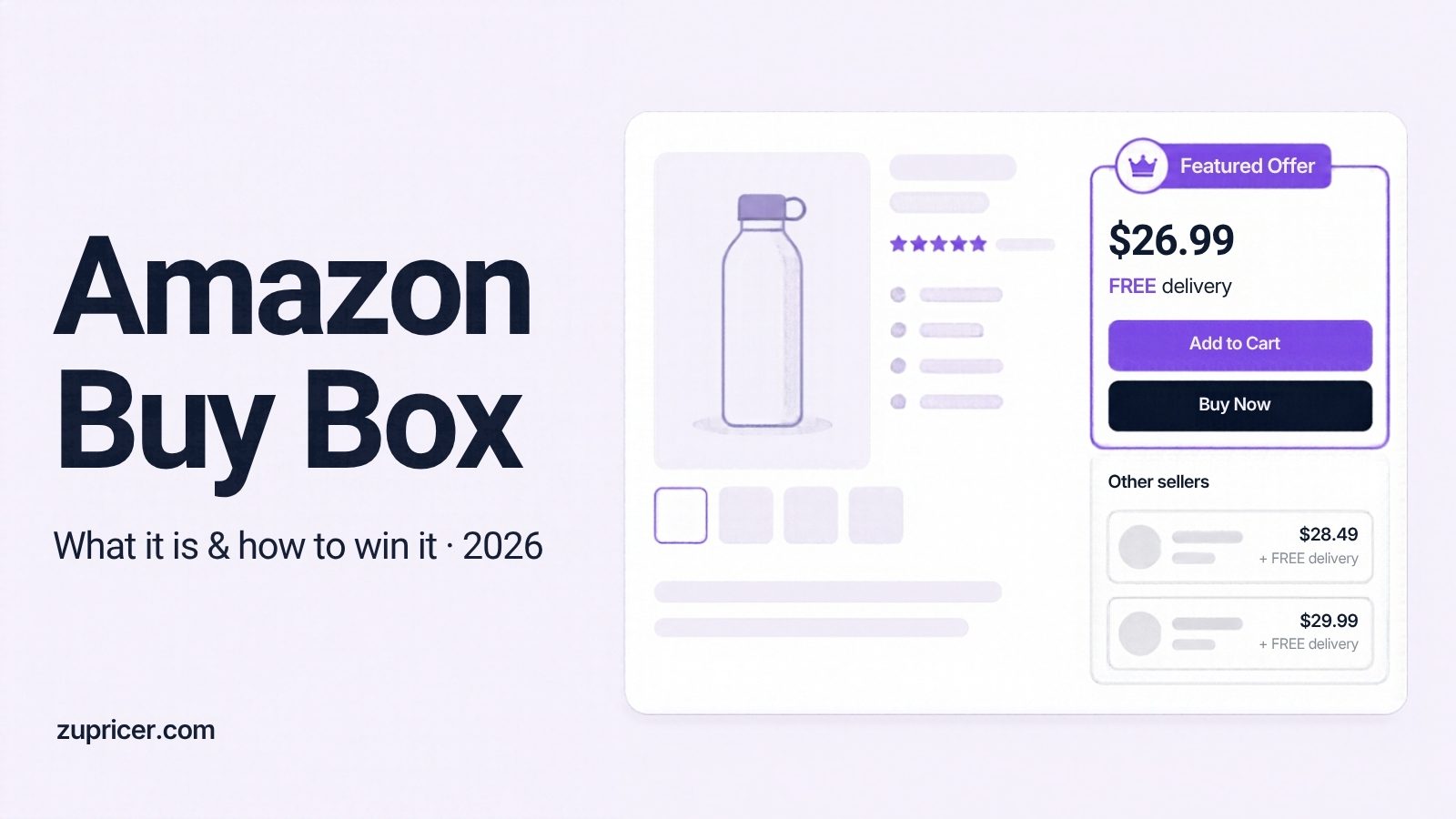
Quick answer: The Amazon Buy Box — officially the Featured Offer — is the offer shown with the Add to Cart and Buy Now buttons on a product page. Amazon picks it based on a competitive total price (including shipping), fast and reliable delivery, a good order experience and available stock. Since July 2026 Amazon has been removing separate seller-eligibility requirements, so more offers now compete for it. To win it, keep your offer in stock, priced competitively against offers on and off Amazon, delivered fast — and never let your price fall below a fee-aware floor.
What changed in 2026
In July 2026 Amazon announced on its Seller Forums that it would begin removing seller eligibility requirements for the Featured Offer, rolling out gradually across all stores and completing by the end of 2026. Amazon said it is not changing how the Featured Offer is selected — competitive pricing, delivery speed and performance still decide — and that being considered does not guarantee your offer will be featured. No seller action is required. (Amazon announcement)
What it means in practice: more offers on the same listing are now in the running, and many brand owners who used to hold the Featured Offer almost all the time reported lower Featured Offer percentages. The announcement did not address other rules such as item condition or stock.
Last reviewed: November 12, 2026.
What is the Amazon Buy Box?
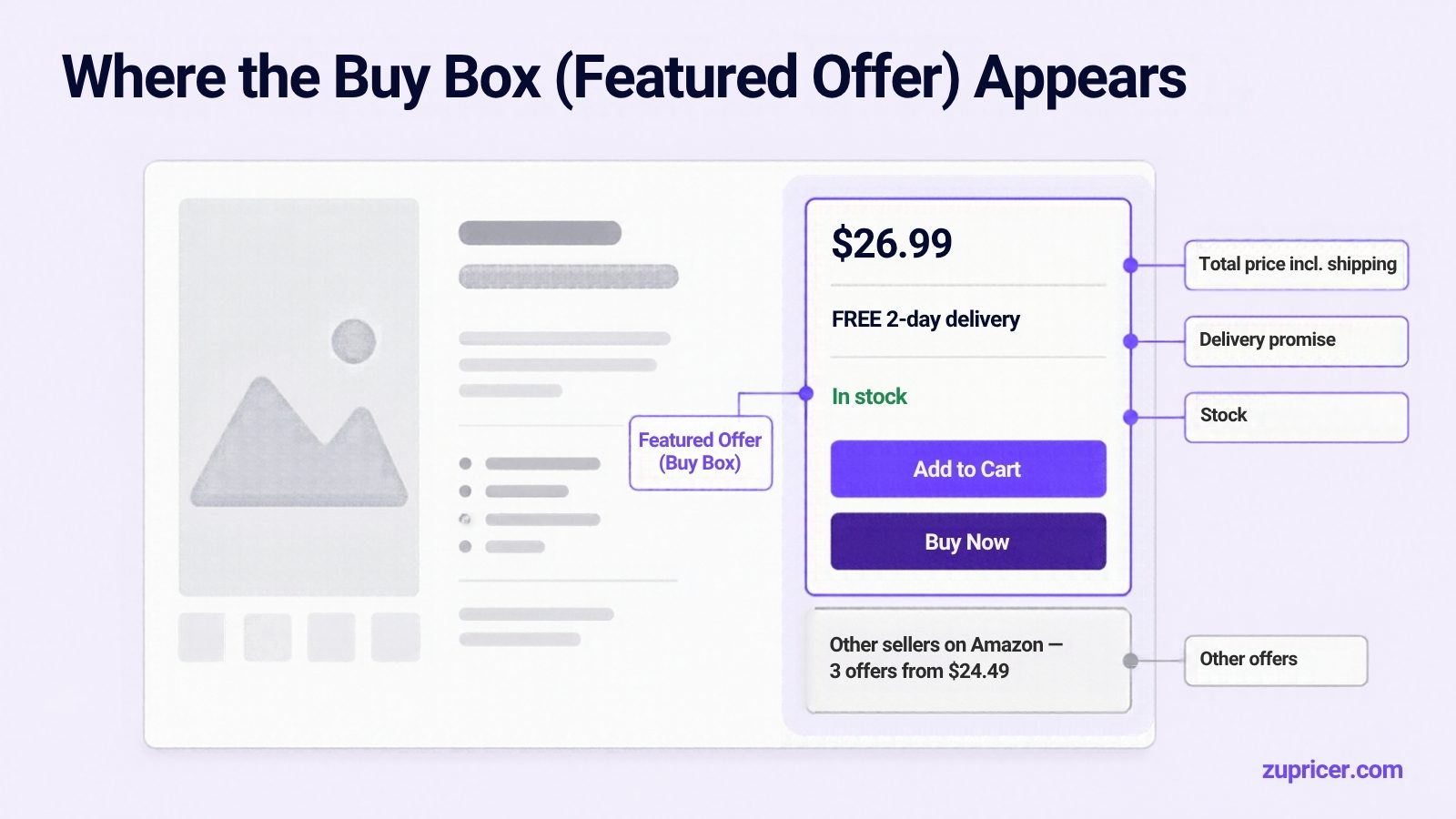
Amazon lists every seller’s offer for a product on one detail page. The area near the top with the price, delivery promise and the Add to Cart and Buy Now buttons is the offer display. Amazon calls the offer shown there the Featured Offer; sellers still call it the Buy Box. Other offers appear under “Other sellers on Amazon” or “See all buying options”.
Amazon describes the Featured Offer as its recommendation for the best overall value for the customer — and it evaluates every offer that way, including Amazon’s own retail offer. (Amazon: Buy Box and Featured Offer)
What does “Buy Box win” mean?
A “Buy Box win” means your offer is the Featured Offer at that moment, so a customer clicking Add to Cart buys from you. Because several sellers can be competitive on the same listing, the Featured Offer can move between sellers during the day. Your share of it is measured as your Featured Offer percentage (see below).
What decides who wins the Featured Offer
Amazon has published four factors. It does not publish weights, and nobody outside Amazon knows them.
| Factor | What Amazon says | What you can do |
|---|---|---|
| Competitive price | Judged on the total price including shipping, commonly at or below the lowest-priced alternatives — on and off Amazon. | Price against both the offers on your listing and major retailers outside Amazon; check Pricing Health. |
| Delivery | Fast, free shipping with high-certainty delivery dates. Amazon notes that seller-fulfilled offers can be as effective as FBA when they deliver fast and reliably. | Shorten handling time, offer free shipping, keep delivery promises accurate. |
| Order experience | Correct, undamaged and authentic items, accurate charges, few chargebacks and complaints, healthy account. | Watch Account Health, Voice of the Customer and chargebacks. |
| Stock | An out-of-stock offer cannot be featured. | Avoid stockouts on your best sellers; use restock alerts. |
In a follow-up post after the 2026 change, an Amazon staff member listed the same essentials — total price including shipping, delivery speed, free shipping and returns, seller performance and stock — and noted that reviews and star ratings, the Prime badge and fulfillment method on their own are not selection factors (Seller Forums). In practice, FBA often helps because it delivers fast and reliably — not because Amazon rewards the FBA label itself.
Widely repeated, but unverified
- “80–90% of Amazon sales go through the Buy Box.” Repeated across the web, but we could not find an original study behind it. It is safe to say the Featured Offer captures the large majority of sales; the exact share isn’t published by Amazon.
- “Price is X% of the algorithm, delivery speed Y%.” These weightings are estimates from third-party articles. Amazon has never published weights.
- “FBA always wins at a higher price.” Faster, more certain delivery helps; the fulfillment label alone does not.
Lost to a competitor, or ineligible at any price?
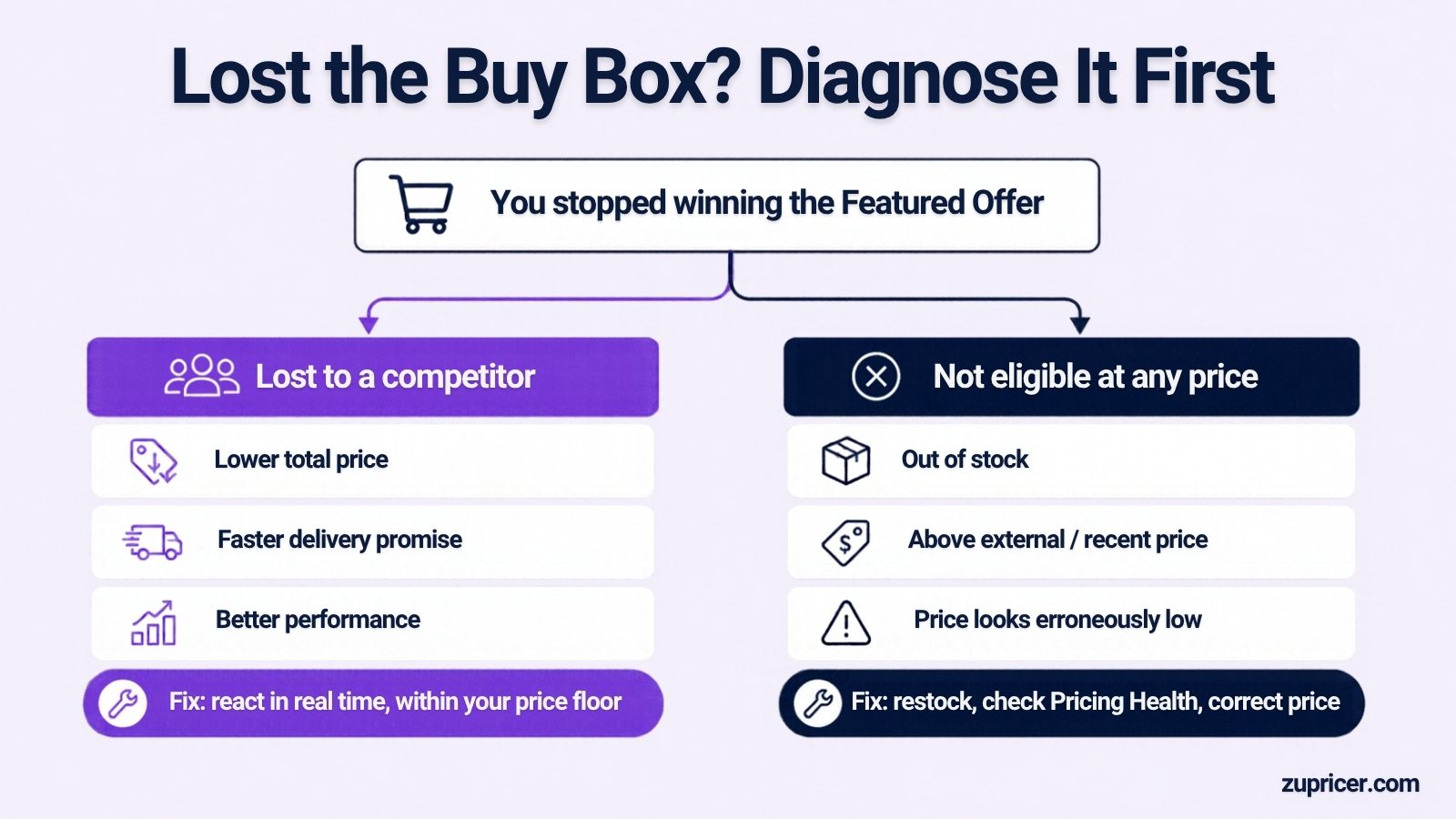
When you stop winning, first work out which of two situations you’re in — the fix is completely different.
1. You lost to a competitor
Your offer is eligible, but another offer looks like better value right now: a lower total price, a faster delivery promise or better performance. Here, pricing and delivery decisions matter, and reacting quickly to competitor changes pays off.
2. Your offer can’t be featured at any price
Amazon can make an offer ineligible regardless of what competitors do. Common causes:
- Out of stock.
- Price too high versus the Competitive External Price — the lowest recent price for the item at a reputable retailer outside Amazon. If your total price is above it (or above recent prices when no external price exists), the offer can lose eligibility.
- Price that looks erroneously low — a sudden drop can be flagged as a pricing error.
In Seller Central, check the Featured Offer eligible column in Manage All Inventory and the Pricing Health page, which lists ineligible offers and offers priced within 5% of the Featured Offer price.
The price signals behind it
Amazon’s Selling Partner API documentation lists the reference prices used in these decisions (SP-API pricing FAQ):
- Featured Offer Expected Price — the price at which your offer can become the Featured Offer.
- Competitive External Price — the lowest recent off-Amazon price at a reputable retailer.
- Competitive price threshold and list price (MSRP).
- Average selling price over the last 60 days, excluding promotions.
Tools connected through SP-API can receive notifications when the Featured Offer or the top offers change, and when your offer becomes ineligible for pricing reasons — which is what makes real-time reactions possible.
“No featured offer available”
If a listing shows no Featured Offer, Amazon has found no offer it wants to recommend — usually because offers are out of stock, priced too high, or priced suspiciously low. Customers can still buy through “See all buying options”, but sales typically drop sharply. The fix is on the offer side: restock, bring the total price in line with the external and recent prices, or correct an error.
Understanding your Featured Offer percentage
Seller Central’s Business Reports show a Featured Offer (Buy Box) percentage per child ASIN under Detail Page Sales and Traffic by Child Item. It is commonly described as the share of product-page views where your offer was the Featured Offer.
- It’s based on page views, not time. Repricing tools often show a time-based “win rate”, so the two numbers rarely match.
- Sole sellers aren’t guaranteed 100%. After the 2026 change, many brand owners reported their percentage falling even when they were the only seller — often because the offer wasn’t featured at all at times (for example, priced above the external price) rather than because a rival won.
- Track it by SKU, week over week. A sudden drop usually points to stock, a pricing-health issue or a new competitor.
Special cases
- Amazon as a competitor. When Amazon Retail sells the same item, its offer is evaluated like any other. You can still win it with a competitive total price and fast delivery, but chasing Amazon’s price below your floor rarely pays.
- A second Featured Offer in Europe. Under commitments made binding by the European Commission in 2022, Amazon shows a second competing offer in many European stores when it differs enough on price or delivery.
- Business (B2B) Featured Offer. Amazon Business customers can see a separate business Featured Offer; Amazon offers business-price rules in Automate Pricing.
- Hijackers on your brand listing. Don’t race them on price. Protect your share with stock, pricing health and Brand Registry tools.
Does automated repricing win more Buy Boxes?
It depends on the listing:
| Situation | Does repricing help? | Why |
|---|---|---|
| Shared listing, several active sellers | Yes | Offers change many times a day; reacting in real time keeps you competitive without watching Seller Central. |
| Competitor goes out of stock | Yes | A good repricer raises your price when competition disappears — often the most profitable move. |
| You’re the only seller | Limited | Nothing to react to; the job is staying below the external price and protecting margin. |
| “Always undercut” settings | No | Triggers price wars and can produce “erroneously low” prices. Guardrails prevent it. |
Zupricer is built for the first two rows: it reacts in real time through SP-API, uses Buy Box strategies based on Buy Box ownership, competitor count, seller rating, fulfillment and stock, and keeps every price inside min/max and minimum-margin guardrails. Compare options in our guide to the best Amazon repricers.
Worked example (illustrative)
Three offers on one listing: Seller A (FBM, $24.49 + $3.99 shipping, 4–6 day delivery), Seller B (FBA, $26.99, free 2-day delivery), and you (FBA, $27.49, free 2-day delivery, floor $25.80).
- Seller A’s total price is $28.48 with slower delivery, so it’s not the strongest value despite the lower item price.
- You and Seller B offer the same delivery; a small move to $26.99 makes you equally competitive — no need to go lower.
- If Seller B runs out of stock, you can move back up toward the competitive external price instead of staying at $26.99.
For which strategy to use in each situation, see our Amazon pricing strategy guide. The point isn’t the exact numbers — it’s that total price, delivery promise and stock matter together, and a floor stops you from giving margin away.
For ready-made rules by listing situation — crowded FBA, Amazon on the listing, sole seller, low stock — see our Amazon repricing strategies and rule recipes.
How to win and keep the Buy Box: a checklist
- Stay in stock on your top ASINs; an out-of-stock offer can’t be featured.
- Price on total price (item + shipping) against offers on the listing and major retailers off Amazon.
- Check Pricing Health weekly and fix ineligible offers first.
- Deliver fast and reliably — free shipping, short handling time, accurate delivery dates (FBA or a strong FBM operation).
- Protect account health: low defects, cancellations and chargebacks; valid tracking.
- Set fee-aware floors and sensible ceilings for every SKU — our minimum price calculator does the math — see how to set min and max price rules.
- React to competitor changes in real time on shared listings, and raise prices when competitors stock out.
- Track Featured Offer % by SKU and investigate any sudden drop.
Related guides
- Buy Box rotation explained
- FBA vs. FBM and the Buy Box
- How to protect your margins while winning the Buy Box
- Case study: from 15% to 62% Buy Box win rate
- Competitive price monitoring for Amazon sellers
Frequently asked questions
Is the Buy Box the same as the Featured Offer?
Yes. “Featured Offer” is Amazon’s official name; “Buy Box” is the name sellers have used for years.
What does “Buy Box wins” mean on Amazon?
It means your offer is the one shown with Add to Cart and Buy Now, so customers who click those buttons buy from you. Your share over time appears as your Featured Offer percentage.
Do I still need to meet eligibility requirements after the 2026 change?
Amazon is removing separate seller-eligibility requirements gradually through the end of 2026. Your offer still needs to be competitive on price, delivery and performance, and in stock, to be featured.
Does the lowest price always win the Buy Box?
No. Amazon looks at total price including shipping together with delivery speed, order experience and stock, so a slightly higher price with faster, more reliable delivery can win.
Can FBM sellers win the Buy Box?
Yes. Amazon says seller-fulfilled offers can be as effective as FBA when they deliver fast, free and reliably.
Why do I lose the Buy Box when I’m the only seller?
Usually because your offer isn’t eligible at that moment — out of stock, or priced above the competitive external price or recent prices. Check Pricing Health.
Why does my listing say “No featured offers available”?
Amazon found no offer it wants to recommend — typically due to stock, high prices or prices that look like errors. Fix the offer and the Featured Offer usually returns.
What is a good Featured Offer percentage?
There’s no official benchmark. Sole sellers should be close to their in-stock, competitively priced time; on shared listings, a stable or rising share at a healthy margin matters more than chasing 100%.
Where do I find my Featured Offer percentage?
In Seller Central under Reports → Business Reports → Detail Page Sales and Traffic by Child Item.
Can I win the Buy Box against Amazon?
Yes. Amazon’s own offer is evaluated like others; competitive total price and fast delivery can win, but don’t follow Amazon below your floor.
Does a lower price on another website affect my Buy Box?
It can. If your Amazon price is above the competitive external price from a reputable retailer, your offer may not be featured.
Does automated repricing actually win more Buy Box sales?
On shared listings with active competitors, yes — real-time reactions and raising prices when rivals stock out help. On sole-seller listings it adds little, and “always undercut” settings hurt.
Keep your Buy Box share without giving away margin
Start a 14-day free trial of Zupricer to react to competitor and Buy Box changes in real time — always within your price floors.