Disclosure: this guide is published by Zupricer, which makes Amazon repricing software. Amazon facts come from Amazon’s seller pages, Seller Forums announcements and Selling Partner API documentation, checked on November 20, 2026.
What is Amazon competitive analysis? Amazon competitive analysis is the process of tracking the sellers and brands you compete with on Amazon. You look at their offers, prices, Featured Offer (Buy Box) ownership, fulfillment, ratings, stock, listings, reviews, keywords and ads. Then you turn what you find into decisions about pricing, positioning and advertising. If you resell other brands’ products, start with who owns the Featured Offer.
Key takeaways
- You have two kinds of competitors: sellers on the same listing, and rival products on other listings. Analyze them differently.
- Since July 2026, more offers compete for the Featured Offer, so your competitive set is probably bigger than it was.
- Amazon gives you useful free data. Some of it, like Brand Analytics, is limited to brand owners.
- Analysis only pays off when it changes something: a price rule, a listing fix or an ad decision.
Looking for a competitive analysis of Amazon the company?
Amazon’s main rivals as a business are Walmart, eBay, Temu, Shein and Shopify-powered stores in retail. In cloud computing, AWS competes with Microsoft and Google. This guide is about something else: how sellers analyze their competitors on Amazon.
Why competitive analysis matters more in 2026
Amazon changed the rules in 2026. In July, it announced that it was removing the seller-eligibility step for the Featured Offer, with a gradual rollout through the end of the year. Previously, some sellers’ offers were never considered. Now every offer can be ranked. Amazon says the selection criteria themselves haven’t changed: price including shipping, delivery speed and customer experience still decide (Amazon).
In practice, sellers you could ignore before may now take turns winning the Featured Offer. Amazon also says self-fulfilled offers can be as effective as FBA, so fulfillment method alone no longer tells you who’s a threat. For the full picture, see how the Amazon Buy Box (Featured Offer) works.
Step 1: Identify your real competitors
Offer-level competitors
These are the other sellers on the same listing (ASIN). They matter most if you resell wholesale or arbitrage products. You’ll find them under “Other sellers on Amazon” on the product page. Track all of them, because any of them can take the Featured Offer from you.
Listing-level competitors
These are rival products a shopper might buy instead of yours. They matter most for private label. Look at page-one search results for your main keywords and at the sponsored products shown on your own listing. Brand owners can also use Brand Analytics to see the top clicked products for a search term and what customers buy together. A practical starting point is three to five substitute ASINs per product. That’s a suggestion, not a rule. If you’re a small brand up against much bigger ones, see how to compete with big sellers on Amazon.
Step 2: What to analyze, the competitor checklist
Offers, prices and Featured Offer ownership
Compare the landed price (item price plus shipping), not just the item price. Note how many offers there are and who wins the Featured Offer, and how often that changes. One snapshot tells you little. Ownership over a week or a month tells you a lot.
Fulfillment and delivery promise
Record whether each offer is FBA, FBM or Seller Fulfilled Prime, and the delivery date the shopper sees. Faster, narrower delivery windows help an offer compete. More on this in FBA vs FBM.
Seller ratings
Check each seller’s feedback percentage and count for the past 12 months. A new seller with few ratings and a low price behaves very differently from an established seller at the same price.
Stock levels and stock-outs
Note who runs out of stock and how often. An out-of-stock offer can’t be featured, so a rival’s stock-out is often your best chance to win the Featured Offer at a higher price.
Listings and reviews
For rival products, compare images, titles, bullet points, A+ content, star rating and review count. Read the critical reviews and note the three most common complaints. Those are positioning opportunities for you.
Keywords, search share and ads
Brand owners can see their share of impressions, clicks and purchases for each search query in Brand Analytics’ Search Query Performance dashboard. Note which competitors appear in sponsored slots for your main terms. You can’t see a competitor’s ad spend or ACOS, so treat any tool that claims to show it as an estimate.
Sales signals
Amazon doesn’t share competitors’ sales. You can read three signals: Best Sellers Rank (BSR) trend, the “bought in past month” badge, and niche data in Product Opportunity Explorer. Amazon says BSR reflects sales compared with similar products in the same category, weights recent sales more heavily and isn’t affected by reviews (Amazon). Any unit-sales number based on BSR is an estimate.
Free Amazon tools vs third-party tools
Start with what Amazon gives you, then add paid tools where you have gaps. For a broader overview, see our guide to Amazon pricing tools.
| Tool | Cost | What it shows | Limits |
|---|---|---|---|
| Product page / “Other sellers on Amazon” | Free | Current offers, Featured Offer winner, delivery promise, seller ratings | Manual, one moment in time |
| Pricing Health / Manage All Inventory | Free (Seller Central) | How your price compares with the Featured Offer price | Your own offers only |
| Brand Analytics | Free, Brand Registry required | Search query share, top clicked products per term, items bought together | Brand owners only; aggregated data |
| Product Opportunity Explorer | Free (Seller Central) | Niche demand, search trends, prices, reviews, returns | Niche level, not per seller |
| Best Sellers Rank | Free | Relative sales rank and trend | Not unit sales; varies by category |
| Price history trackers | Free or paid | Price, offer count and BSR history | Third-party data |
| Research suites | Paid | Sales estimates, competitor keywords, market share | Estimates |
| Repricer | Paid | Competing offers and Featured Offer changes in real time, plus automatic price action | Pricing only; no keyword or ad data |
Brand Analytics needs Brand Registry and a Professional selling account (Amazon). Its Demographics dashboard is US-only. If price tracking is your main need, our guide to competitive price monitoring software goes deeper.
Analyzing competitor pricing strategy on Amazon
Price history shows you how a competitor prices, not just what they charge. Common patterns:
- Frequent small moves, often a few cents at a time: almost certainly a repricer.
- Rare, large changes: manual pricing. These sellers react slowly, which you can use.
- Temporary drops with coupons or deals: promotions, not a new permanent price.
- Always sitting at one price, never below: a seller at their floor. Undercutting them rarely helps for long.
Use these patterns to set your own approach, which our Amazon pricing strategy guide covers in full. Watch the upper limit too. Amazon’s Fair Pricing Policy can cost you the Featured Offer if your price is far above recent prices on or off Amazon.
Turning analysis into pricing decisions
A competitor signal is useful only if you know how to respond. Here’s a starting playbook:
| What you see | Likely meaning | Pricing response | Guardrail |
|---|---|---|---|
| A rival undercuts by cents every few minutes | Automated repricer | Don’t chase every move. Match only down to your floor, or hold if your delivery or rating is stronger | Cost-based minimum price |
| A rival runs out of stock | Temporary gap | Raise gradually toward your maximum while you hold the Featured Offer | Maximum price |
| A rival runs a coupon or deal | Short promotion | Usually don’t cut your list price; review your ad budget instead | Time-limited rule |
| A new, low-rated seller undercuts | Weaker offer overall | Test holding your price and watch your Featured Offer share | Alert if share drops |
| Amazon itself is on the listing | Hard to beat on price | Compete only where margin allows, or move on | Floor |
| You alone own the Featured Offer | Room to improve margin | Step your price up in small increments | Maximum price |
Matching every drop is how price wars start. See how to avoid a price war. Ready-made rules for these situations are in our repricing strategies guide.
Manual tracking shows you patterns, but offers change minute by minute. Through the Selling Partner API, Amazon sends a notification whenever any of the top 20 offers on a product you sell changes, or when the Featured Offer winner or price changes. Each notification includes every offer’s price, fulfillment method, seller rating and shipping time (Amazon SP-API). That’s what lets an Amazon repricer apply your playbook automatically. It doesn’t show competitors’ costs, ad spend or sales, so pair it with the rest of this checklist.
Build a simple competitor-tracking template
A spreadsheet is enough to start. Use one row per competitor for each check:
| Date | ASIN | Competitor | Landed price | Fulfillment | Rating (count) | Featured Offer? | In stock? | Notable change | Our action |
|---|---|---|---|---|---|---|---|---|---|
| Nov 20 | B0XXXXXXX | Seller A | $24.49 | FBA | 97% (1,200) | Yes | Yes | Dropped $0.50 | Hold; floor $22.80 |
Add a weekly summary line: Featured Offer share by seller, price range and any new entrants.
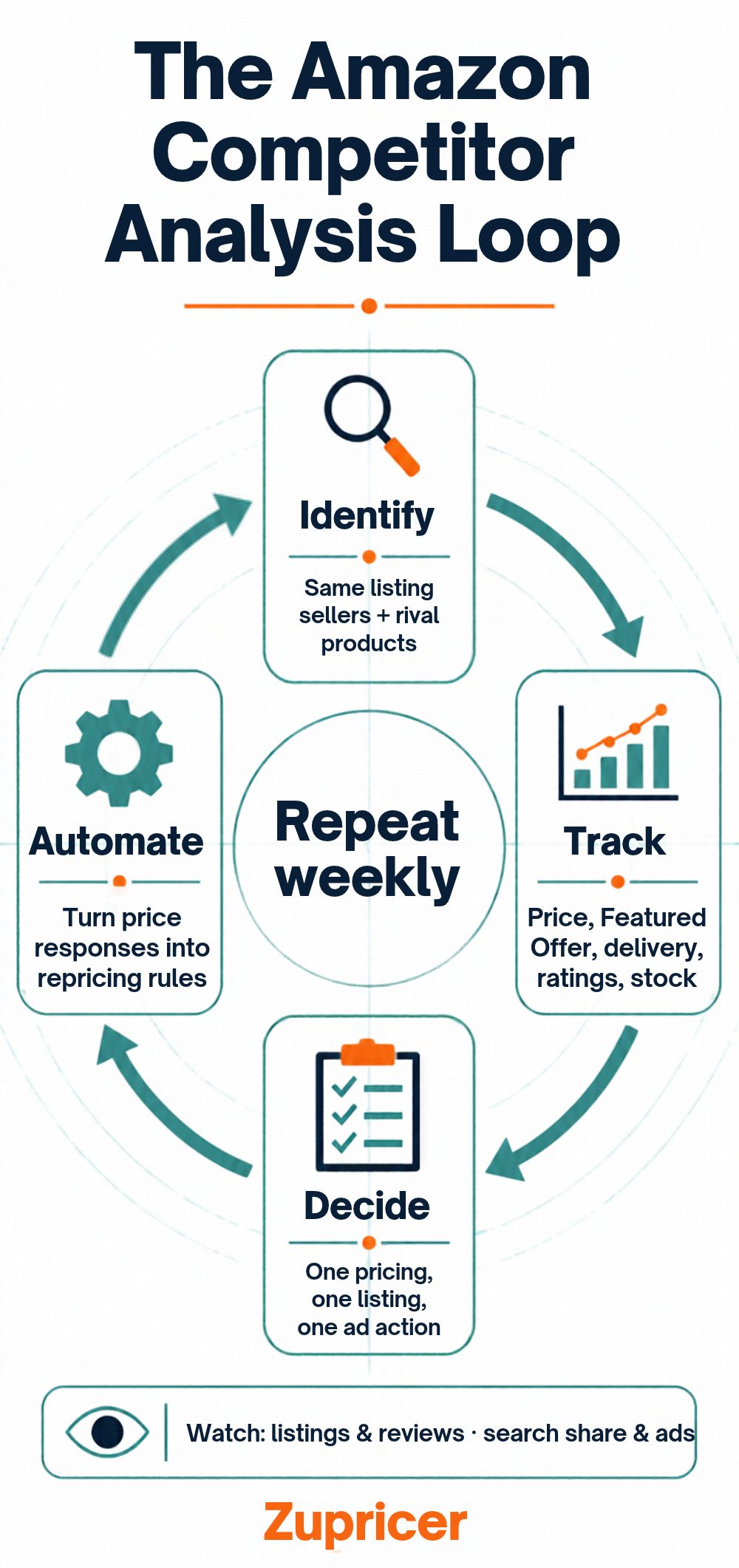
How often should you check? Prices and Featured Offer ownership change daily, so automate those. Review listings, reviews and ads weekly, the overall landscape monthly and your strategy quarterly. If daily price checks are already eating your time, compare manual vs automated repricing.
Common mistakes
- Copying instead of differentiating. Use competitors’ weaknesses, don’t clone their listings.
- Matching every price drop. It hands your margin to the most aggressive seller.
- Ignoring new entrants. Since the 2026 change, new offers can compete for the Featured Offer sooner.
- Treating estimates as facts. Sales and keyword numbers from tools are modeled, not reported by Amazon.
- Analysis without action. End each review with one pricing, one listing and one ad decision.
Frequently asked questions
What is an Amazon competitive analysis?
It’s tracking the sellers and products you compete with on Amazon, including prices, Featured Offer ownership, fulfillment, ratings, stock, listings, reviews and ads, and using that to make pricing, listing and advertising decisions.
How do I find my competitors on Amazon?
For the same product, check “Other sellers on Amazon” on the listing. For rival products, look at page-one search results, sponsored products on your listing and, if you’re a brand owner, Brand Analytics.
Can I see a competitor’s sales on Amazon?
Not exactly. Amazon doesn’t share other sellers’ sales. Best Sellers Rank, the “bought in past month” badge and third-party estimates give you a rough idea.
What is the best Amazon competitor analysis tool?
It depends on what you need. Start with Amazon’s free tools. Add a research suite for keywords and sales estimates, or a repricer if competitor pricing is your main concern.
Can I see which keywords my competitors rank for?
Not directly from Amazon. Brand owners see their own share by search query in Brand Analytics. Reverse-ASIN tools estimate competitors’ keywords.
How often should I analyze my Amazon competitors?
Watch prices and Featured Offer ownership continuously, ideally automated. Review listings and ads weekly, the market monthly and your strategy quarterly.
Does the lowest price always win the Buy Box?
No. Amazon weighs price including shipping, delivery speed and customer experience. A slightly higher price with faster delivery can win.
What does a competitive analysis of Amazon the company include?
Usually a comparison with rivals such as Walmart, eBay, Temu and Shopify in retail, and Microsoft and Google in cloud, often with a SWOT analysis. This guide covers competitor analysis for sellers on Amazon.
Put your analysis to work
Zupricer reprices in real time through Amazon’s SP-API, using scenario-based strategies and cost-based floors, so your competitor playbook runs around the clock. Plans start at $79 a month with every feature included. Start a 14-day free trial, or compare options in our guide to choosing the best Amazon repricer.