Disclosure: this guide is published by Zupricer, which makes Amazon repricing software. Competitor details were checked on each vendor’s own website on November 11, 2026 — see “How we put this comparison together” below.
Quick answer: The best Amazon repricer is the one that reacts to competitor and Buy Box changes in real time, never prices below your profit floor, and stays affordable as your catalog grows. If you sell only on Amazon, an Amazon-specialized repricer such as Zupricer — real-time repricing, Buy Box strategies, min/max guardrails and every feature on every plan from $79/month — is usually the most practical fit. If you also sell on Walmart, look at a multichannel tool.
Key takeaways
- Speed matters, but where a repricer sets your price matters more: the goal is the Buy Box at the highest price that still wins, not the lowest price.
- Every SKU needs a fee-aware minimum price. Without one, any repricer can sell at a loss.
- Compare total cost at your size. Several tools cap their smart repricing by plan, bill annually only, or charge add-ons.
- Amazon-only sellers benefit from a tool built around Amazon’s Buy Box signals; multichannel sellers need broader marketplace support.
What an Amazon repricer does (and what it should never do)
An Amazon repricer connects to your Seller Central account through Amazon’s Selling Partner API and updates your offer prices automatically based on market signals: competitor prices, who holds the Buy Box, fulfillment method, seller ratings and stock levels. Instead of checking listings by hand, the repricer watches the market continuously and moves your price inside the limits you set.
A good repricer balances two jobs:
- Stay competitive — react quickly when a competitor changes price or the Buy Box rotates.
- Protect profit — never follow a competitor below your floor, and raise prices when competition disappears.
What it should never do is turn your catalog into a race to the bottom. A tool that only knows how to undercut by one cent wins some Buy Boxes and loses most of your margin — see why undercutting competitors kills your profits. To understand the monitoring side, read our guide to competitive price monitoring software for Amazon.
The three types of Amazon repricers
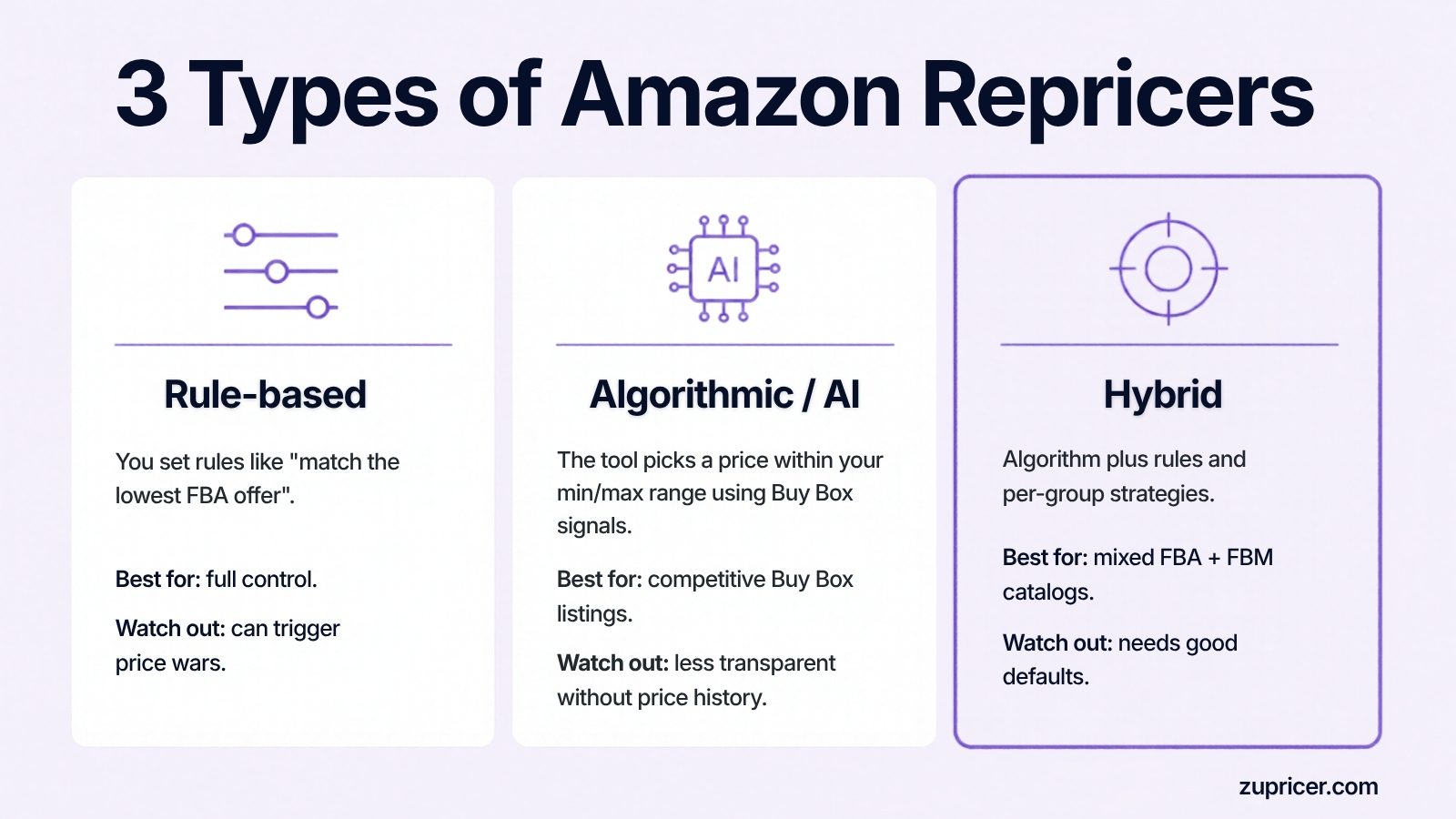
| Type | How it works | Good for | Watch out for |
|---|---|---|---|
| Rule-based | You define rules such as “match the lowest FBA offer” or “stay $0.10 below the Buy Box price”. | Sellers who want full control and predictable behavior. | Rules that ignore context can trigger price wars; setup takes time on large catalogs. |
| Algorithmic / AI | The tool reads Buy Box signals and competitor behavior and chooses a price within your min/max range. | Competitive Buy Box listings. | Less transparent if the tool doesn’t show why a price changed. Some vendors limit how many SKUs can use the AI mode. |
| Hybrid | A real-time engine plus rules, templates and per-group strategies you can override. | Mixed catalogs (FBA + FBM, high and low competition). | Needs sensible defaults so you aren’t buried in settings. |
Zupricer is a hybrid: it reprices in real time from Buy Box and competitor signals, and lets you shape behavior with strategies, templates and guardrails. New to the topic? Read what an Amazon repricer is and how it works.
Amazon’s free Automate Pricing vs. a dedicated repricer
Seller Central includes a free Automate Pricing tool with basic rules (for example, matching the Featured Offer or the lowest price). It is a reasonable starting point for a handful of listings. Sellers usually outgrow it when they need:
- Profit-aware floors built from cost of goods and Amazon fees, not a single manual minimum.
- Buy Box strategies that can hold a higher price when you have a fulfillment or rating advantage.
- Bulk control — strategies by product group, templates and cost imports for thousands of SKUs.
- History and analytics — every price change, what triggered it and how Buy Box share moved.
We compare both approaches in detail in manual vs. automated repricing.
Do you even need a repricer?
If you are a private label brand and the only seller on every listing, you don’t need to chase competitors — but you can still benefit from profit-maximizing logic when you are the only offer, strict price floors to protect brand value, and alerts when a hijacker appears. Resellers, wholesalers and arbitrage sellers on shared listings benefit most, because they compete for the Buy Box every day. Not sure yet? Check the 5 signs you need an automated repricer.
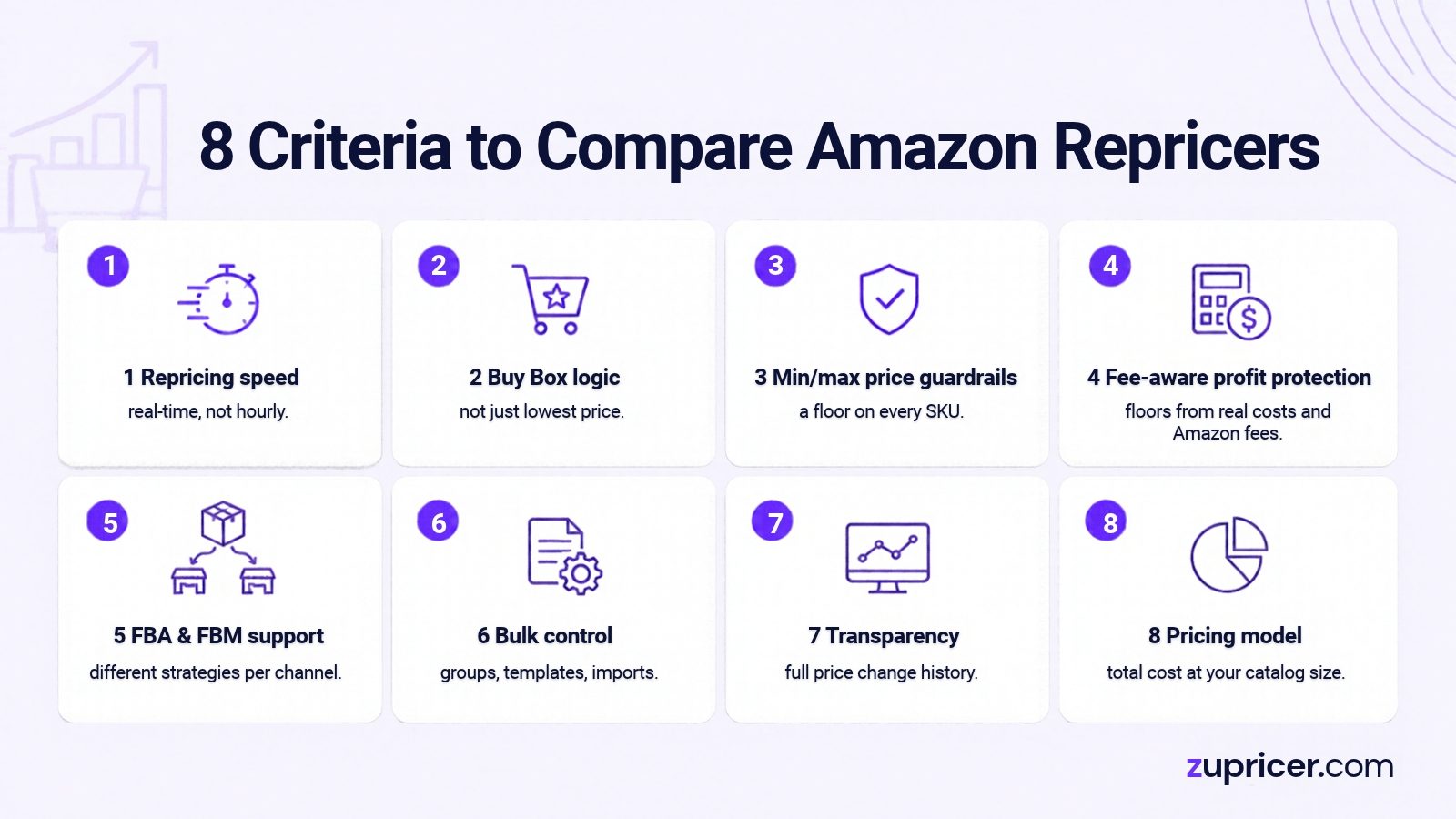
8 criteria to compare Amazon repricers
1. Repricing speed
The Buy Box can rotate many times a day on competitive listings. A repricer that updates on a fixed schedule reacts after the opportunity is gone. Look for event-driven, real-time repricing — see the hidden cost of slow repricing. Related: how often you should reprice on Amazon.
2. Buy Box logic, not just “lowest price”
Amazon’s Featured Offer is not awarded to the cheapest offer by default. Fulfillment method, delivery speed, seller metrics and stock all matter. A strong repricer recognizes when you can win at a higher price — for example as an FBA seller competing against FBM offers — and doesn’t cut price when it isn’t needed. See how the Amazon Buy Box (Featured Offer) works.
3. Minimum and maximum price guardrails
Every SKU needs a floor and a ceiling. Without them, one bad competitor offer can push your price into a loss. Check whether floors can be set in bulk and whether the tool flags listings stuck at their minimum. See how to set minimum and maximum price rules.
4. Fee- and cost-aware profit protection
A floor is only as good as the numbers behind it. The best tools calculate minimums from cost of goods, referral fees, FBA fees and shipping so the floor reflects a real target margin.
5. FBA and FBM support
If you sell both ways, the repricer should treat FBA and FBM competitors differently and let you run different strategies by channel.
6. Catalog scale and bulk control
Assigning strategies one SKU at a time works for 20 products, not 2,000. Look for product groups, templates, bulk cost and min/max imports, and filters for listings that need attention.
7. Transparency and price history
You should see every price change, what triggered it and how your Buy Box share moved. If you can’t explain a price change, you can’t improve the strategy.
8. Pricing model and total cost
Repricers charge by sales volume, by listing count, by SKUs and repricing events, or a flat fee — and some limit their smart repricing to part of your catalog, bill annually only, or sell key features as add-ons. Always price the plan you will need in a year, not just the entry tier.
The best Amazon repricers in 2026 at a glance
| Tool | Approach | Marketplaces | Starting price* | Pricing basis | Free trial |
|---|---|---|---|---|---|
| Zupricer | Hybrid: real-time engine + Buy Box strategies, rules and guardrails | Amazon | $79/mo | Monthly revenue and SKU count; every feature on every plan | 14 days |
| Aura | AI-driven, Buy Box-focused | Amazon, Walmart | $37/mo | Sales volume tiers; AI engine capped by plan on lower tiers | 14 days |
| BQool | Rule-based and AI repricing within a wider seller suite | Amazon (regions sold separately) | $25/mo | Listing count; AI listing limits much lower than rule-based limits | Yes (see vendor) |
| Seller Snap | Game-theory AI that models competitor reactions | Amazon, Amazon Business, Walmart | $100/mo (billed annually) | SKU and revenue tiers | 15 days |
| RepricerExpress (by Repricer.com) | Rule-based with templates and simulation mode | Mainly Amazon | Not published | SKUs × channels × repricing speed | 14 days |
| Informed Repricer (formerly Informed.co) | Automated strategy-based repricing | Amazon, Walmart | See vendor | Flat monthly fee, unlimited listings; paid add-ons | See vendor |
*Entry-level list prices as shown on each vendor’s website on November 11, 2026. Prices change; confirm on the vendor’s pricing page before buying.
Tool-by-tool: who each repricer suits
Zupricer — best for Amazon-only sellers who want every feature from day one
Zupricer focuses on one marketplace and the signals that decide Amazon’s Buy Box, instead of spreading across channels. For a full evaluation checklist, use our Amazon repricer buyer’s guide.
- Instant repricing: when a competitor changes price or Buy Box ownership changes, your price is recalculated immediately.
- Buy Box strategies that use Buy Box ownership, FBA vs. FBM, seller rating, competitor count and stock — and avoid unnecessary price drops.
- Profit guardrails: min/max prices and minimum-margin protection, cost-based strategies and bulk cost imports.
- No feature tiers: Starter, Growth and Scale include the same features; you only move up when revenue or SKU count grows, and you can switch plans at any time.
- Analytics and history: Buy Box win rate, price-change history, competitor behavior and strategy performance.
Consider something else if: you need one tool for Amazon and Walmart or eBay.
Aura — best for sellers who also sell on Walmart and want an AI engine
Strengths: low entry price, AI repricing focused on the Buy Box, very fast repricing claims, Walmart support. Check: the AI engine covers a limited number of listings on lower plans, and plans step up with sales volume.
BQool — best for budget-conscious sellers who also want review and feedback tools
Strengths: low listing-based entry price, both rule-based and AI repricing, a broader suite (advertising, reviews, feedback, profit). Check: AI repricing is limited to far fewer listings than rule-based repricing on each plan, and additional Amazon regions are billed separately.
Seller Snap — best for highly competitive Buy Box niches with a larger budget
Strengths: game-theory AI designed to avoid price wars, Amazon Business and Walmart support, analytics add-ons. Check: the entry plan is billed annually and has a revenue ceiling; higher tiers cost several times more.
RepricerExpress — best for sellers who prefer hands-on rules
Strengths: mature rule-based repricing with templates and a simulation mode. Check: pricing isn’t published and depends on SKUs, channels and repricing speed, so you’ll need a quote. Full breakdown: Zupricer vs RepricerExpress.
Informed Repricer — best for sellers repricing Amazon and Walmart together
Strengths: flat monthly pricing with unlimited listings across Amazon and Walmart. Check: some capabilities are sold as add-ons; eBay isn’t supported. Informed.co now operates as Informed Repricer — see Zupricer vs Informed.
What you’ll really pay as you grow
For a quick payback estimate, see the ROI of using a repricing tool.
Entry prices are only half the story. Here is what Zupricer costs for three typical Amazon sellers — with every feature included at each level:
| Seller profile | Monthly revenue | Active SKUs | Zupricer plan | Monthly cost |
|---|---|---|---|---|
| Growing reseller | $15,000 | 800 | Starter | $79 |
| Established wholesale seller | $80,000 | 5,000 | Growth | $129 |
| High-volume seller | $300,000 | 20,000 | Scale | $199 |
When you price other tools for the same profiles, check four things that often change the real number:
- Smart-repricing caps — does the AI or algorithmic mode cover your whole catalog, or only part of it on your plan?
- Revenue or sales ceilings — how fast will you be pushed into the next tier?
- Billing terms — is the advertised price monthly, or only with annual payment?
- Add-ons and regions — are extra marketplaces, business pricing or faster repricing billed separately?
How we put this comparison together
We reviewed the leading “best Amazon repricer” guides to see which questions sellers ask, then checked each competitor’s approach, supported marketplaces, entry price, pricing basis and trial on the vendor’s own website on November 11, 2026. Where a vendor doesn’t publish a detail, we say so instead of estimating. Zupricer details come from our own product and pricing. We update this page when vendors change their plans.
How to choose a repricer by seller type
| Seller type | What matters most | Look for |
|---|---|---|
| FBA wholesale / resellers | Winning shared listings against many sellers | Real-time Buy Box repricing, FBA vs. FBM logic, bulk groups |
| Online & retail arbitrage | Costs change constantly | Bulk cost imports, cost-based floors, repricing history |
| Private label brands | Protecting brand price and margin | Only-seller profit logic, strict floors, hijacker alerts |
| FBM and dropshipping | Supplier price and stock volatility | Out-of-stock detection, loss-prevention guardrails |
| Amazon + Walmart sellers | One tool for both marketplaces | A multichannel repricer such as Aura, Seller Snap or Informed |
More by business model on our solutions page, and in FBA vs. FBM and the Buy Box.
How to set up an Amazon repricer in 5 steps
- Clean your cost data. Every SKU needs an accurate landed cost, including inbound shipping and prep.
- Set floors and ceilings. Calculate a minimum that covers fees and your target margin, and a maximum that stays credible to buyers.
- Group your catalog. Separate high-competition Buy Box listings, low-competition listings and listings where you are the only seller.
- Start with one strategy per group. Let it run for one to two weeks before adding exceptions.
- Review the history weekly. Check Buy Box share, margin and listings stuck at their floor, then adjust. If results stall, here is why a repricing tool may not be working.
Worked example: setting a minimum price
Prefer not to do the math by hand? Use our free Amazon minimum price calculator.
A product costs $8.00 landed. The referral fee is 15% and the FBA fee is $4.50. You want at least $2.00 profit per unit. The minimum price is (8.00 + 4.50 + 2.00) ÷ (1 − 0.15) = $17.06. Set the floor at $17.06 and the repricer will never follow a competitor below it. For the ceiling, stay below the price where Amazon may consider your offer uncompetitive — Seller Central’s pricing tools flag offers above its competitive price threshold, which can cost you Featured Offer eligibility.
Common repricing mistakes
- No minimum price — the fastest way to sell at a loss.
- Undercutting by default — it triggers competitor repricers and everyone’s margin falls (see smart vs. aggressive repricing).
- One strategy for the whole catalog — high- and low-competition listings need different logic.
- Never raising prices — when competitors go out of stock, your price should move up.
- Ignoring the data — without price history and Buy Box share, problems stay hidden.
More in 10 costly repricing software mistakes, and for choosing the right approach per listing, see our Amazon pricing strategy guide.
Frequently asked questions
What is the best repricer for Amazon?
For sellers who sell only on Amazon, the strongest choice is usually an Amazon-specialized repricer that reprices in real time, understands Buy Box signals beyond price and enforces fee-aware minimum prices — Zupricer is built for exactly this. Sellers who also need Walmart or eBay should consider a multichannel tool.
What is the best Amazon repricer for small sellers?
Look for a low monthly price without feature restrictions, a free trial and simple strategy templates. Zupricer’s Starter plan ($79/month) includes every feature for up to $20,000 in monthly revenue and 1,000 SKUs. Budget tools with lower entry prices often limit AI repricing to a small number of listings.
How much does an Amazon repricer cost?
Entry plans range from about $25 to $100+ per month depending on the vendor, and costs rise with listings, revenue or SKU count. Zupricer plans are $79, $129 and $199 per month with a 14-day free trial.
Is Amazon’s free Automate Pricing enough?
For a few simple listings, it can be. Sellers switch to a dedicated repricer when they need profit-aware floors, Buy Box-specific strategies, bulk control and detailed price history.
AI vs. rule-based repricing: which is better?
Rule-based repricing gives full control but needs constant tuning; AI or algorithmic repricing adapts automatically but can be opaque. A hybrid approach — a real-time engine with rules and guardrails you control — gives most sellers the best of both.
Do private label sellers need a repricer?
Less than resellers do. If you are the only seller, a repricer is mainly useful for profit-maximizing pricing, strict floors and reacting quickly if another seller joins your listing.
Can I lose the Buy Box by pricing too high?
Yes. If your price is well above competing offers or above Amazon’s competitive price threshold, you can lose Buy Box eligibility. A good repricer tests higher prices but pulls back before that point.
Is repricing allowed on Amazon?
Yes. Amazon allows price changes through third-party tools connected via the Selling Partner API. You remain responsible for complying with Amazon’s pricing policies, including its fair pricing policy.
Will a repricer start a price war?
Only if it undercuts blindly. With price floors and Buy Box logic that competes on more than price, a repricer can hold or even raise prices.
How fast should an Amazon repricer react?
On competitive Buy Box listings, as close to real time as possible. Delays of an hour or more mean you react after the Buy Box has already rotated.
Which repricers work on Walmart as well as Amazon?
Aura, Seller Snap and Informed Repricer support Walmart in addition to Amazon. Zupricer is Amazon-only by design, which lets it focus entirely on Amazon’s Buy Box behavior.
Try it on your own listings
The most reliable way to compare repricers is on your own catalog. Start a 14-day free trial of Zupricer, set your price floors, and compare your Buy Box share and margin before and after.